
Following the launch of Obsidian’s new ‘properties’ feature, I embarked on a journey to optimize my notes to capitalize on this improvement. My first area of focus was naturally my existing templates, where I faced some difficulties in establishing a dynamic date. Let me share how I solved the issue.
What are obsidian properties?
In Obsidian, properties feature as enhanced metadata for your notes, serving a role comparable to that of tags yet equipped with extended functionalities. These properties facilitate the contextualization and categorization of your notes and enable the execution of advanced queries with Dataview. Moreover, Obsidian’s ‘Properties’ feature seamlessly interprets YAML frontmatter, rendering it in a manner that enhances user experience.
It brings a Notion-like experience into the metadata of your notes. Imagine being able to sort your notes by due date, or quickly find all notes related to a specific project. The possibilities are endless, and the control is in your hands.
Default Date in Properties
Now, let’s address the issue I faced: incorporating default dates into templates.
Templates are incredibly useful for maintaining consistency, adding a dynamic date is an essential part. You could manually enter the date each time you create a note, but that defeats the purpose of automation.
Here’s how you can set up a template with a default date using Obsidian properties on existing templates.
Step 1: Change how the properties are displayed
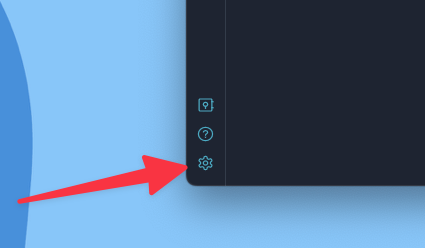
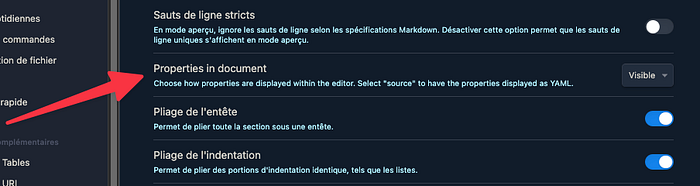
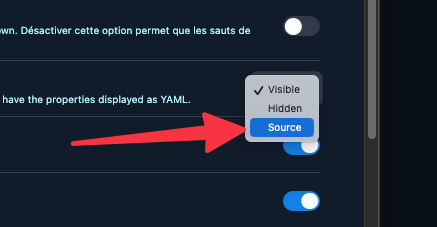
Navigate in the settings to the editor section and change the visibility to « source ».
Step 2: Edit the template
In your new template, you will now see the properties in YAML text format. You can now add the following line, or edit the date property:
date: {{date:YYYY-MM-DD}}
This will create/set a property called “date” and populate it with the current date whenever you create a new note using this template.
Set the properties visibility back to “Visible”.
That’s it !
Conclusion
Properties in Obsidian are more than just metadata; they are a powerful feature that can significantly enhance your note-taking and knowledge-management experience.
Hope that this tip will help you for adopting the properties feature in your templates!
Happy note-taking!